

*This post may contain affiliate links for which I earn commissions.*
If you spend a lot of time in video meetings or recording content from your home office, you already know how much a good webcam can change the game.
Two popular picks among remote workers and creators are the Logitech C922x HD Pro Webcam and the Razer Kiyo X Full HD Streaming Webcam. Both promise sharp visuals, clear audio, and easy setup, but which one is the better fit for your desk setup?

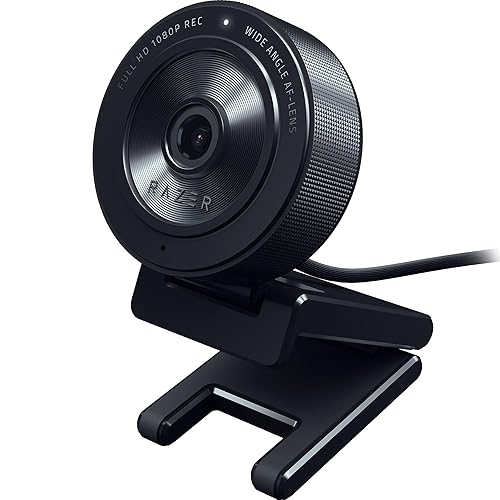
Quick Comparison Table
| Feature | Logitech C922x HD Pro Webcam | Razer Kiyo X Full HD Streaming Webcam |
|---|---|---|
| Resolution & Frame Rate | 1080p at 30fps | 1080p at 30fps or 720p at 60fps |
| Focus Type | Autofocus | Autofocus (manual control option) |
| Light Adjustment | Automatic HD light correction | Adjustable via Razer Synapse 3 |
| Audio | Dual stereo mics | Single mic |
| Software | Logitech Capture & XSplit VCam (3-month license) | Razer Synapse 3 |
| Mounting | Standard monitor clip | Flexible tilt mount, tripod compatible |
| Best For | Professional calls, low-light environments | Custom setups, streamers, multi-monitor users |
| Typical Price Range | Slightly higher | Slightly lower |
Similarities
Both webcams offer Full HD resolution, auto-focus, and built-in microphones, the essentials for anyone who wants to look and sound professional during calls. They’re plug-and-play, compatible with platforms like Zoom, Teams, and Google Meet, and include software for adjusting brightness and color. Whether you’re video conferencing, streaming, or chatting with friends, both models deliver a big step up from a laptop’s built-in camera.
Key Differences
The Logitech C922x focuses on balance and polish. It delivers 1080p video at 30 frames per second, and its automatic light correction does a great job keeping your image clear even in low light. It also comes with dual stereo mics for more natural audio and includes a 3-month XSplit VCam license for virtual background effects.
The Razer Kiyo X, on the other hand, gives you flexibility in frame rates, 1080p at 30fps or 720p at 60fps, perfect if you want smoother motion for streaming or video calls. It’s also highly customizable through Razer Synapse 3, letting you tweak focus, brightness, contrast, and color balance. Plus, its mounting design is a win for those using multiple monitors or tripods.
Which One Fits Your Setup?
If your workspace lighting isn’t ideal or you move around during calls, the Logitech C922x will keep you looking crisp without constant adjustments. It’s also great if you value clear stereo sound right out of the box.
If you prefer control and customization, the Razer Kiyo X shines. It’s especially handy if you want to fine-tune your image settings or use your webcam across different setups, from meetings to creative streams.
Value for Money
The Razer Kiyo X often comes in at a slightly lower price, offering similar video quality and flexibility for less. The Logitech C922x costs a bit more but feels more polished, especially in audio performance and automatic lighting adjustments. For most remote professionals, both webcams offer solid value; it just depends on whether you prefer convenience or customization.
Personal Experience
When I first bought the Logitech years ago, I didn’t really know how to choose a webcam. Back then, I was just happy to have something that worked better than my laptop camera. It wasn’t until I upgraded that I realized how much resolution, positioning, and setup ease actually matter.
My old 720p camera didn’t hold up for client calls, but the Logitech C922x felt like a big step forward, even if I later found out there were similar options for less. Still, I was genuinely happy with how it performed and how easy it was to use.
Both webcams are excellent for remote workers who want to look professional on video.
- Choose the Logitech C922x HD Pro Webcam if you want great lighting correction, reliable audio, and effortless setup.
- Choose the Razer Kiyo X Full HD Streaming Webcam if you like customizing your image, streaming at smoother frame rates, or saving a little money.
Either way, you’ll end up with a quality webcam that helps you look and feel more confident in every call.